
Lanzhao AI Smart Store 3.0 released: checkout, ordering and inventory now run on large language models
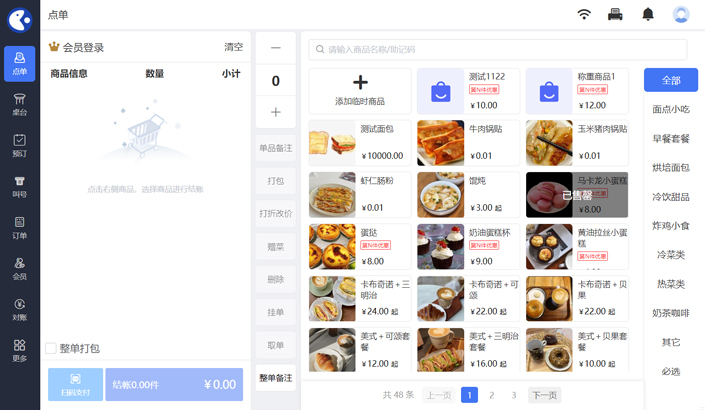
On 28 August, Lanzhao released AI Smart Store 3.0. The most important change in this version is that large language models are now connected to the three things a store uses every single day: checkout, ordering and inventory.
Tasks that now take one sentence
What used to require opening three or four menus in the back office can now be done by asking:
- "Set the Americano to 15 yuan" — the price-change intent is recognised, the product is located and a preview is shown before anything takes effect;
- "Which days sold best last week" — business data is read automatically and a comparison is generated; no more manual exports;
- "How much milk is left" — the answer is converted into usable stock units so it can drive a decision directly.
All of this runs on the local checkout terminal. Stores can still take payments and keep records when the network is down, and data syncs automatically once the connection returns.
Three visible improvements
1. New staff get up to speed faster
Training new employees is one of the biggest headaches in chain retail. Version 3.0 turns frequent operations into guided conversations. In practice, onboarding time dropped from about two days to half a day.
2. Stocktaking takes less time
Stocktake lists are generated automatically based on sales movement, with suggestions on which categories to check first. Stores measured an average reduction of around 40% in monthly stocktaking time.
3. Business data is always one question away
Owners no longer need to remember where a report lives. Ask on a phone and get margin, average basket or hourly sales — then share the result with a partner in one tap.
Data security and control
Business data remains in the store's own database and the Lanzhao cloud account. AI only reads aggregated statistics that have been authorised, and never touches customers' payment credentials. Stores decide in the back office whether to enable AI features, and can turn them off at any time.
How to upgrade
Existing customers can detect version 3.0 in "System update" on the checkout terminal and upgrade in one step. New stores can download the installer from the Download Center on our website, or call +86 189-3686-1599 to book a demo.

 Video Channel
 Douyin
 Xiaohongshu
 Kuaishou
 Bilibili